CORS errors when submitting a form with fetch: what they mean and how to fix them
Blocked by CORS policy" is one of the most confusing errors in web development. Learn why a plain HTML form never hits it, why fetch does, and how to fix CORS errors when posting forms to another domain.
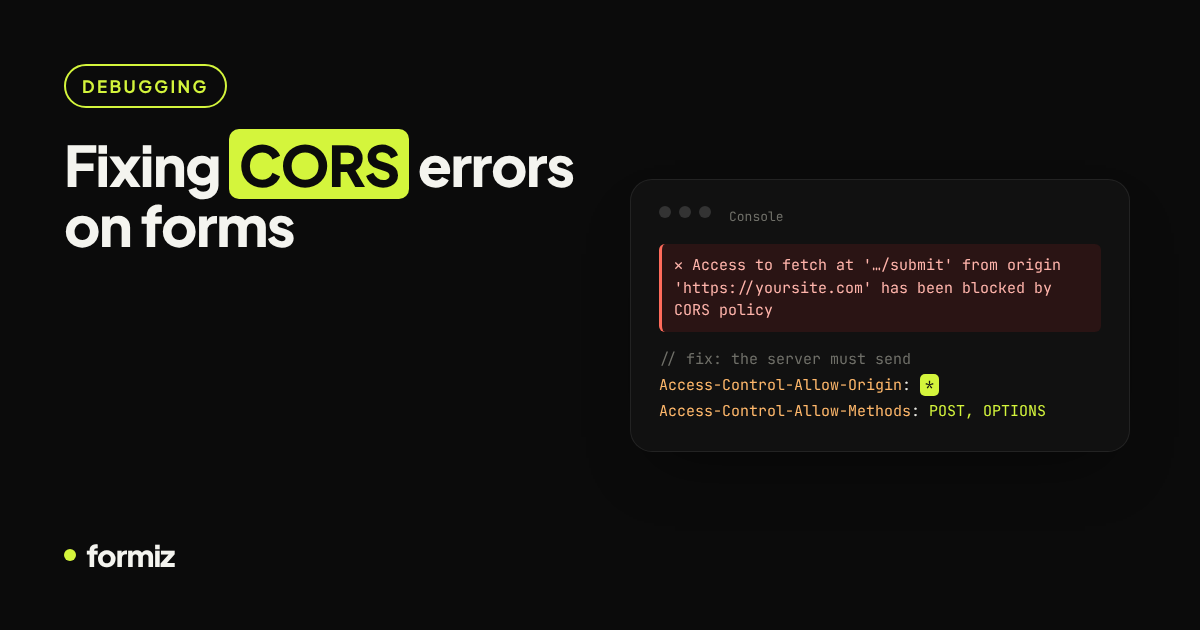
You switch a working HTML form to fetch for a nicer success message, and suddenly the console says:
The form worked a minute ago. What changed?
The short version
- A plain HTML form navigates the browser to another site. Browsers have always allowed that, so CORS does not apply.
fetchlets your JavaScript read the response from another site. Browsers only allow that if the other site explicitly says your origin may read it, using CORS headers.
So the fix is almost always on the server you are posting to, not in your form.
What the server needs to send
For a simple form post with fetch, the response must include:
Access-Control-Allow-Origin: https://yoursite.com(or * for "any site"). If your request uses a non-simple header, such as Content-Type: application/json, the browser first sends an OPTIONS preflight request, and the server must answer it with:
Access-Control-Allow-Origin: https://yoursite.com
Access-Control-Allow-Methods: POST, OPTIONS
Access-Control-Allow-Headers: Content-Type, Accept
"Simple" requests skip the preflight
A request is "simple" (no preflight) when it is a GET or POST with only basic headers and a body of type FormData, URLSearchParams or plain text. That is one more reason to send forms with FormData:
// No preflight: multipart/form-data is a simple content type
fetch(url, { method: 'POST', body: new FormData(form) });

// Preflight: application/json triggers OPTIONS first
fetch(url, {
  method: 'POST',
  headers: { 'Content-Type': 'application/json' },
  body: JSON.stringify(data),
});
Both work if the server is configured correctly; the first has fewer moving parts.
Fixes, depending on who owns the server
You own the endpoint
Add the headers above, and handle OPTIONS requests by returning 204 with the same headers. In most frameworks there is a CORS middleware that does this.
It is a third-party service
Check that the service supports browser submissions. Form backends are built for it: Formiz answers with Access-Control-Allow-Origin: * and handles the preflight, so fetch works from any site. Which sites may actually submit is controlled separately, with allowed domains (see public vs secret keys).
If a service does not send CORS headers, it is not meant to be called from the browser. Call it from your own server instead.
Do not use mode: 'no-cors'
It makes the error disappear and the response unreadable (an "opaque" response). You will not know whether the submission succeeded, and JSON bodies are not sent the way you expect. It hides the problem instead of solving it.
Other errors that look like CORS
- Wrong URL or 404/500. Some servers omit CORS headers on error responses, so a server error shows up as a CORS error. Check the Network tab for the real status code.
- Redirects. If the endpoint redirects (for example
httptohttps, or a missing trailing slash), the redirect response may lack CORS headers. Use the exact final URL. - Browser extensions that block requests can produce similar messages. Try a private window.
file://pages. Opening your HTML file directly from disk gives an origin ofnull. Serve it with a local web server.
Debugging checklist
- Open DevTools → Network, find the request (and any
OPTIONSbefore it). - Check the status code. 4xx/5xx? Fix that first.
- Check the response headers for
Access-Control-Allow-Origin. - If there is a preflight, check its headers too.
- Make sure you are not setting unnecessary headers that trigger a preflight.
Once CORS is sorted, see submit a form with fetch and FormData for a production-ready handler.
Get your form working in five minutes
Create a free Formiz key, add it to your form and receive submissions by email and Telegram. No server, no SMTP, no card.