Is It Safe to Put an API Key in Frontend Code? Public vs Secret Keys
Some API keys are made to live in your HTML and JavaScript, others must never leave the server. A quick way to tell them apart and what makes a public key safe.
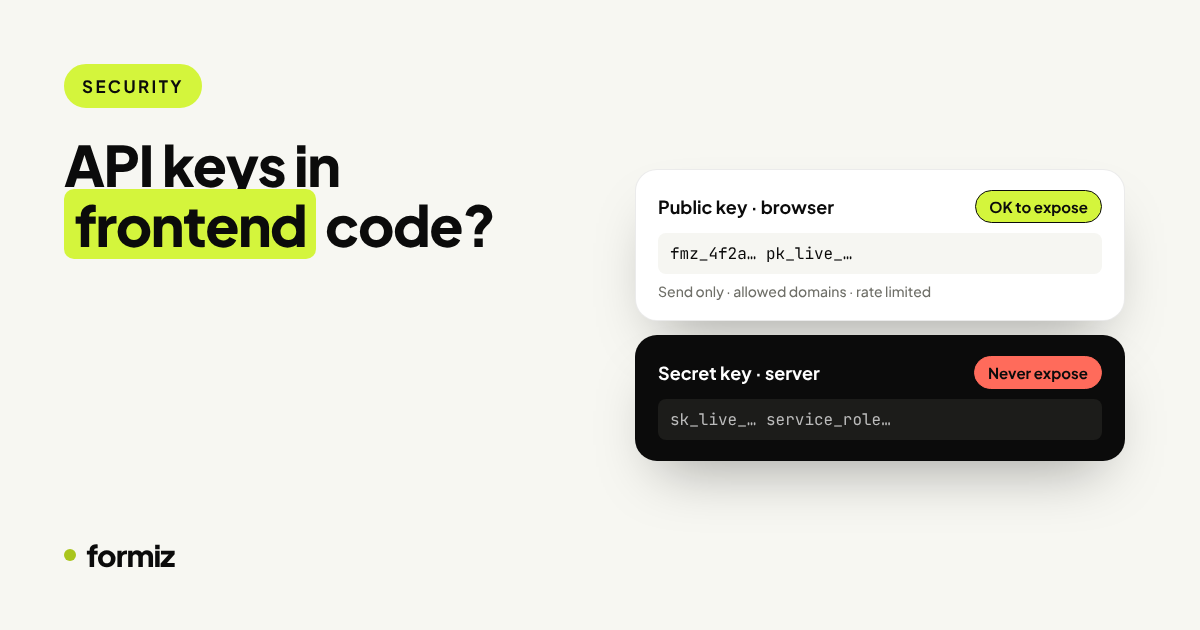
"Never put API keys in frontend code" is good advice, and also incomplete. Plenty of keys are designed to be public: Stripe publishable keys, Google Maps browser keys, Firebase config, analytics IDs and form backend access keys. The real rule is: know what a key can do if a stranger copies it.
Two kinds of keys
| Public (publishable) key | Secret key | |
|---|---|---|
| Where it lives | HTML, JavaScript bundle | Server, environment variables |
| Assumed visible to | Everyone | Only your backend |
| Typical permissions | Narrow: create one kind of thing, read public data | Broad: read, update, delete, spend money |
| Examples | Stripe pk_, Maps browser key, form access key | Stripe sk_, email provider API key, database password |
Anything bundled into frontend code is visible in the browser's dev tools, even if it comes from an environment variable. NEXT_PUBLIC_, VITE_ and PUBLIC_ prefixes exist precisely to mark values that will be exposed.
What makes a public key safe
A key is fine to expose when all of these hold:
- Least privilege. It can only perform a narrow action. A form access key can submit a message to your channels; it cannot read submissions, change settings or send arbitrary email.
- Origin restriction. The provider checks where requests come from. Maps keys can be limited by HTTP referrer; form keys by allowed domains.
- Rate limiting. Abuse from one source is throttled.
- Rotation. You can create a new key and revoke the old one quickly if needed.
- Monitoring. You can see usage and spot anomalies.
How Formiz access keys are designed
- A key (
fmz_…) can only send submissions to the channels of the project it belongs to. - Under Settings → Allowed domains, list your sites; requests whose
Origin/Refereris another domain are rejected with "This domain is not allowed for this access key". Addingexample.comalso covers its subdomains. - Repeated submissions from the same visitor are rate-limited, and honeypot hits are silently dropped.
- You can create additional keys per site and delete a key at any time; a deleted key stops working immediately.
What a copied key cannot do: read your submissions, see your team, change channels or send email to addresses you did not confirm.
Keys that must stay secret
Never put these in frontend code, even "temporarily":
- Email provider API keys (Resend, SendGrid, Postmark, SES)
- Payment secret keys
- Database credentials and service-role keys (for example Supabase
service_role) - Personal access tokens (GitHub, cloud providers)
- Webhook signing secrets
If one leaks (committed to Git, pasted in a public chat, shipped in a bundle), rotate it immediately: create a new one, update your server, revoke the old one. Deleting the commit is not enough; assume it was copied.
A quick audit
- Search your built JavaScript for
sk_,secret,tokenandkey=. - For every key you find, check the provider's docs: is it a publishable key?
- If it is publishable, add origin restrictions and rate limits.
- If it is secret, move it to the server and rotate it.
Related: stop contact form spam without a CAPTCHA and CORS and form submissions.
Get your form working in five minutes
Create a free Formiz key, add it to your form and receive submissions by email and Telegram. No server, no SMTP, no card.