Simple Order Form Template in HTML (No Shop, No Plugin)
A free HTML order form for small businesses that take orders without an online shop: products, quantities, delivery details and a live total. Orders arrive by email and Telegram.
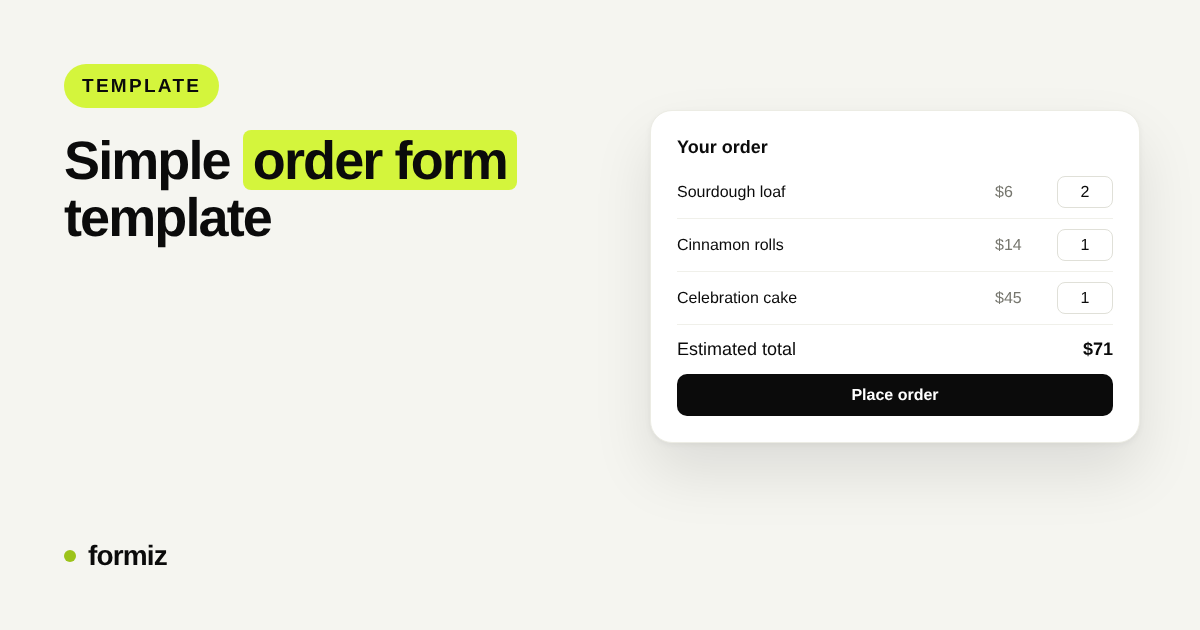
Not every business needs a full online shop. A bakery taking cake orders, a farm selling weekly boxes, a print studio, a caterer or a club selling merchandise often just needs a form: what do you want, how many, where should it go. You confirm the order and arrange payment yourself.
This template does exactly that, with a running total so customers see what they are ordering.
The template
<form action="https://api.formiz.app/submit" method="POST" class="order" id="order">
  <input type="hidden" name="access_key" value="YOUR_ACCESS_KEY">
  <input type="hidden" name="subject" value="New order">
  <input type="hidden" name="redirect" value="https://example.com/order-thanks">
  <input type="hidden" name="estimated_total" id="total-field">
  <input type="checkbox" name="_honey" style="display:none" tabindex="-1" autocomplete="off">

  <h3>Products</h3>
  <label class="item">Sourdough loaf <span>$6</span>
    <input type="number" name="qty_sourdough" min="0" value="0" data-price="6">
  </label>
  <label class="item">Cinnamon rolls (box of 6) <span>$14</span>
    <input type="number" name="qty_rolls" min="0" value="0" data-price="14">
  </label>
  <label class="item">Celebration cake <span>$45</span>
    <input type="number" name="qty_cake" min="0" value="0" data-price="45">
  </label>
  <p class="total">Estimated total: <b id="total">$0</b></p>

  <h3>Your details</h3>
  <label>Name <input name="name" autocomplete="name" required></label>
  <label>Email <input name="email" type="email" autocomplete="email" required></label>
  <label>Phone <input name="phone" type="tel" autocomplete="tel" required></label>

  <fieldset>
    <legend>Pickup or delivery</legend>
    <label><input type="radio" name="fulfilment" value="Pickup" required> Pickup</label>
    <label><input type="radio" name="fulfilment" value="Delivery"> Delivery</label>
  </fieldset>
  <label>Delivery address (if delivery) <textarea name="address" rows="2" autocomplete="street-address"></textarea></label>
  <label>Date needed <input type="date" name="date" required></label>
  <label>Notes <textarea name="message" rows="3"></textarea></label>

  <button type="submit">Place order</button>
  <p class="fine">We confirm every order by email before taking payment.</p>
</form>

<script>
  const form = document.getElementById('order');
  function updateTotal() {
    let sum = 0;
    form.querySelectorAll('[data-price]').forEach((i) => { sum += (Number(i.value) || 0) * Number(i.dataset.price); });
    document.getElementById('total').textContent = '$' + sum;
    document.getElementById('total-field').value = '$' + sum;
  }
  form.addEventListener('input', updateTotal);
  form.addEventListener('submit', (e) => {
    const any = [...form.querySelectorAll('[data-price]')].some((i) => Number(i.value) > 0);
    if (!any) { e.preventDefault(); alert('Please choose at least one product.'); }
  });
</script>
Important: the total is only an estimate
The total is calculated in the visitor's browser, and anyone can change a hidden field. Treat estimated_total as a convenience, recalculate the price yourself before confirming, and never charge automatically based on it. For real online payments, use a payment provider's checkout (Stripe Payment Links, PayPal, Square) and send the link in your confirmation.
Handling orders
- Get notified instantly on your phone with Telegram; handy when orders come in while you are working.
- Confirm automatically with an auto-reply: "Thanks {name}, we received your order for {date}. We will confirm availability and payment details within a few hours."
- Track status in the inbox: New → Contacted (confirmed) → Proposal (awaiting payment) → Won (paid and delivered).
- Keep a running list in Google Sheets for production planning.
Styling
.order { display: grid; gap: 10px; max-width: 560px; }
.order .item { display: grid; grid-template-columns: 1fr auto 80px; gap: 12px; align-items: center; padding: 10px 0; border-bottom: 1px solid #eee; }
.order input, .order textarea { padding: 10px 12px; border: 1px solid #d6d6ce; border-radius: 8px; font: inherit; }
.order .total { font-size: 18px; }
.order button { padding: 14px; border: 0; border-radius: 10px; background: #111; color: #fff; font-weight: 700; }
Taking bookings rather than orders? See the booking request form and quote request form.
Get your form working in five minutes
Create a free Formiz key, add it to your form and receive submissions by email and Telegram. No server, no SMTP, no card.