Contact Form Auto-Reply: Send Visitors an Instant Confirmation Email
Send an automatic "we got your message" email to everyone who fills in your contact form. What to write, examples you can copy, and how to set it up without a server.
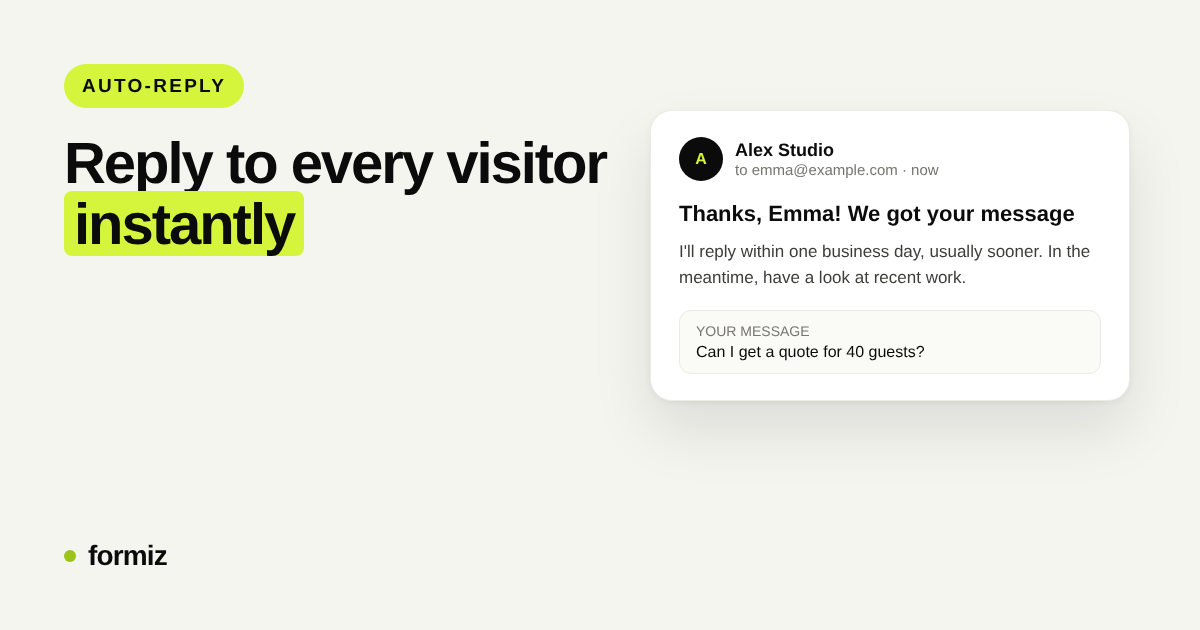
Someone fills in your contact form, presses Send, sees "Thanks!" and then hears nothing for a day. Did it work? Did it land in spam? Should they email you as well, just in case?
An auto-reply answers those questions in seconds. It is a short email sent automatically to the person who submitted the form, confirming that their message arrived and telling them what happens next.
Why an auto-reply is worth it
- Reassurance. Visitors stop wondering whether the form worked, and you get fewer duplicate submissions and "did you get my message?" follow-ups.
- A real reply-to thread. When they answer the auto-reply, it goes straight to your inbox. The conversation has already started.
- Expectations. Saying "we reply within one business day" makes a one-day wait feel normal instead of rude.
- A record for them. With a copy of their answers included, people can see exactly what they sent, which is useful for quotes and bookings.
What to write
Keep it short, human and specific. A good auto-reply has three parts:
- Thank them by name.
- Say when and how you will respond.
- Offer one useful thing while they wait (a link, a price list, an urgent phone number).
Example: freelancer or agency
Example: local business
Example: event or booking request
Things to avoid
- Marketing in the first email. A newsletter pitch in a confirmation feels like a bait-and-switch.
- "Do not reply" addresses. Let people answer; that is the whole point.
- Promises you cannot keep. "Within the hour" is great until you are on holiday.
- Long copies of sensitive data. Include a copy of the answers only if the form does not collect anything sensitive.
Setting it up with Formiz
You do not need a server, an SMTP account or a mail plugin. If your form already sends to Formiz:
- Open your dashboard and go to Channels → Auto-reply to visitors.
- Tick Send an auto-reply when the form has an email field.
- Set the sender name (your business or your own name), a subject and the message.
- Optionally tick Include a copy of their answers.
- Save, then submit your form with your own email address to see it.
Placeholders in curly brackets are replaced with the visitor's answers: {name} becomes the value of the name field, {date} the value of a date field, and so on. Replies to the auto-reply go to your first verified notification address.
The auto-reply is sent only when the submission contains a valid email field, so make sure your form has one:
<input type="email" name="email" autocomplete="email" required>Auto-replies are part of the Pro plan. Your own notification still arrives as usual by email, Telegram or webhook.
Will it land in spam?
Auto-replies are sent from authenticated infrastructure (SPF, DKIM and DMARC aligned), which is the main thing that decides inbox placement. You can help further by:
- writing a plain, personal message rather than a promotional one,
- avoiding link shorteners and lots of links,
- keeping the subject specific ("We received your message, Emma" beats "IMPORTANT!!!").
More on this in why contact form emails go to spam.
Can bots abuse an auto-reply?
A bot could enter someone else's address to make your form email them. Formiz reduces this with a honeypot field, per-IP rate limiting and allowed domains, so most automated submissions never reach the auto-reply step. Keep your message free of anything a stranger could misuse, and see stopping spam without a CAPTCHA for the full setup.
Auto-reply checklist
- The form has an
emailfield markedrequired - The message says when you will reply
- The sender name is recognisable
- Replies reach a monitored inbox
- You tested it with your own address
Get your form working in five minutes
Create a free Formiz key, add it to your form and receive submissions by email and Telegram. No server, no SMTP, no card.