Formspree Alternative: Form Backend With Telegram, Lead Inbox and Webhooks
Looking for a Formspree alternative? Compare what you get, see how to move a Formspree form in five minutes, and decide whether switching is worth it for your site.
Formspree has been the default form backend for static sites for years, and it is a solid product. People usually start looking for an alternative for one of three reasons: they want notifications somewhere other than email, they want to actually manage the leads that come in, or the plan that includes the features they need costs more than they want to pay.
This page is an honest look at how Formiz compares and how to switch if it suits you.
What stays the same
Both services work the same way at the core:
- Your HTML form posts to a URL instead of your own server.
- Submissions are filtered for spam and emailed to you.
- You can redirect visitors to your own thank-you page or submit with
fetchand get JSON back. - Neither needs a plugin, PHP or SMTP settings.
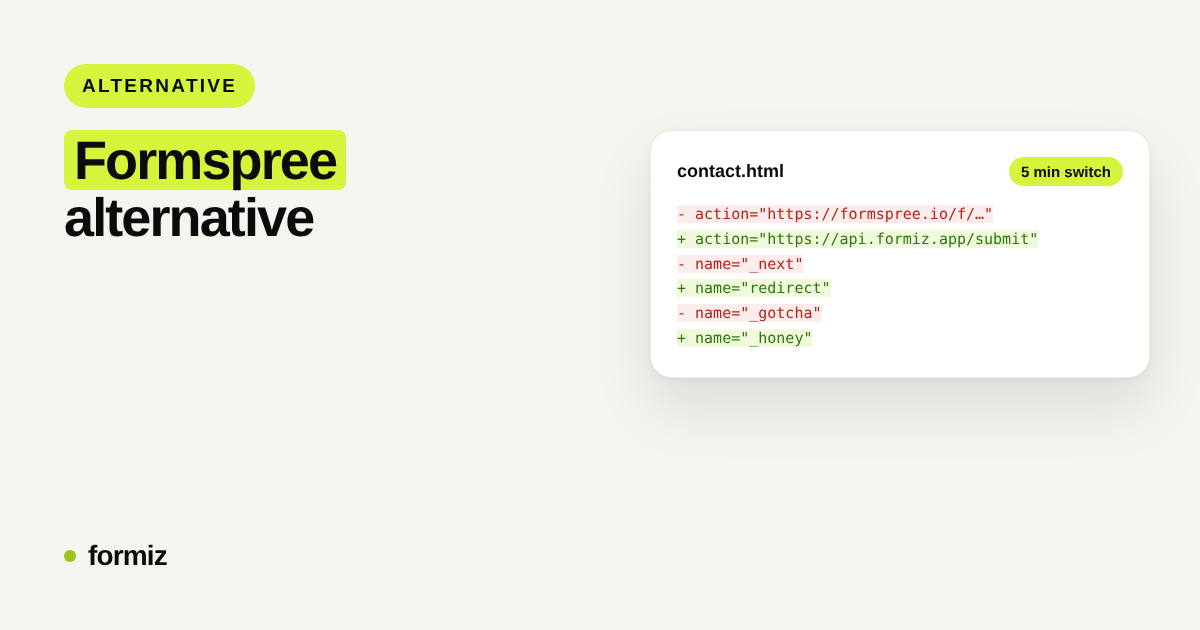
So switching is mostly a matter of changing one URL and renaming a few hidden fields.
Where Formiz is different
| Formiz | |
|---|---|
| Telegram notifications | Built in, private chats or team groups (guide) |
| Lead inbox | Stages (New → Contacted → Proposal → Won/Lost), assignees, notes, search |
| Webhooks | Signed JSON to Make, n8n, Zapier, Slack, Discord (guide) |
| Visitor auto-reply | Your own text with {name} placeholders (guide) |
| File uploads | Up to 5 files, 10 MB each (guide) |
| Claude connection | Ask Claude about your leads (guide) |
| Pro price | $9/month for 2,000 submissions, all of the above included |
| Data location | EU (Frankfurt) |
Both Free plans are similar in size: Formspree's documentation lists 50 submissions a month on its Free tier, and Formiz Free is also 50 a month with email notifications and the lead inbox. The difference shows up when you need more than email: on Formiz, Telegram, webhooks, auto-reply, file uploads and the CRM all sit in the single $9 Pro plan. Check Formspree's plans page for its current features per plan, since pricing changes over time.
Moving a Formspree form
A typical Formspree form looks like this:
<form action="https://formspree.io/f/abcdwxyz" method="POST">
  <input type="hidden" name="_subject" value="New lead">
  <input type="hidden" name="_next" value="https://example.com/thanks">
  <input type="text" name="_gotcha" style="display:none">
  <input name="email" type="email">
  <textarea name="message"></textarea>
  <button>Send</button>
</form>
The same form on Formiz:
<form action="https://api.formiz.app/submit" method="POST">
  <input type="hidden" name="access_key" value="YOUR_ACCESS_KEY">
  <input type="hidden" name="subject" value="New lead">
  <input type="hidden" name="redirect" value="https://example.com/thanks">
  <input type="checkbox" name="_honey" style="display:none" tabindex="-1" autocomplete="off">
  <input name="email" type="email">
  <textarea name="message"></textarea>
  <button>Send</button>
</form>
Field names to rename
| Formspree | Formiz |
|---|---|
action="https://formspree.io/f/…" | action="https://api.formiz.app/submit" + hidden access_key |
_subject | subject |
_next | redirect |
_replyto | reply_to (optional: a field named email is used automatically) |
_gotcha | _honey |
_cc | Add extra verified addresses under Channels → Email |
Your own fields (name, email, message, anything else) stay exactly as they are.
If you submit with JavaScript
Formspree's examples send Accept: application/json. Formiz does the same thing: any fetch request gets { "success": true, "id": "…" } back, so your success and error handling keeps working. See submitting a form with fetch.
Migration checklist
- Create a free account and copy your access key
- Add and verify your notification email under Channels → Email
- Change the form
actionand add the hiddenaccess_key - Rename
_subject,_nextand_gotcha - Add your domain under Settings → Allowed domains
- Send a test submission (how to test a contact form)
- Keep the old form active for a day in case of cached pages, then remove it
When to stay on Formspree
Switching has a cost, even if small. If you only need email notifications for a personal site and your current setup works, there is little reason to move. Formiz is the better fit when you want leads on your phone through Telegram, a place to follow up on them, or automation through webhooks without paying for a higher tier.
Still comparing? Read how to choose a form backend, or the Netlify Forms alternative guide if your forms live on Netlify.
Get your form working in five minutes
Create a free Formiz key, add it to your form and receive submissions by email and Telegram. No server, no SMTP, no card.